
Running multiple WhatsApp accounts on Android is not a hard task. Nowadays, you can find a lot of MOD APKs to install on your Android device. One of them is Fouad WhatsApp. It is one of the latest WhatsApp MODs available. Use this Fouad MOD 2.6 APK for extra premium features. So, we bring this post with all the download details of this superb Dual WhatsApp application.

What is Fouad WhatsApp APK for Android?
I guess you may don’t know about this new WhatsApp MOD from Fouad Mokdad. He has developed Fouad WhatsApp to run two WhatsApp on one device easily. We all use the GBWhatsApp for Android which is the most popular. It has got some super exciting features over the standard WhatsApp software. The Fouad Mods WhatsApp is similar to that, with extra features. Experience no lag with beautiful material design. Enjoy many functions with depth customization, chat lock, privacy settings and more. Change the styles with the new themes available.
Important note: For users with a banned account and using this app for 1st time:
- Install regular WhatsApp and login.
- Install new Fouad WA Anti-Ban v2.6 and use the linked device method.
Best features of this app
- Themes Store: With themes, you can customize the look of FouadWA at any time. Go to the theme store, and there you can find a vast collection of themes, choose any of them and start experiencing a fresh look at WhatsApp.
- Group message Settings: With this new group messaging setting now, group admin can invite people using group invite links. Control who can message in WhatsApp groups. Also, in the settings group, the admin can only message in the group.

- Call blocking: With Fouad WhatsApp advanced call blocking features now completely control who can call you. Customize every aspect of call blocking.
- Privacy settings: Privacy is an essential thing in social media. Using Fouad WhatsApp, you can hide your last online status. Show/hide control for second tick, blue tick, call recording and message typing status.
- Send any file type: You can send any file type like zip, apk, exe, jpg, png, etc. to your friends and families through FouadWA which is not possible in WhatsApp.
- Message anyone: Unlike WhatsApp, you can message anyone using their number only without the need of saving the number. Help in one-time messaging as well as in quick messaging situations.
- Pin Conversations: Pin up to 1000 important conversations. It will help in finding them quickly on top of chats when you need it.
- HD Quality image share: Share the image with others without losing its quality. On WhatsApp, it loses image quality when we send an image. However, in Fouad WhatsApp, it will ask you to send the original image when you want to send an image.
Other cool features like tick styles and app launcher icon-changing options are there. Its filters for Images and Videos and Material UI with Special Calling UI are also very useful. Changes font styles with Font Preview in this mod by Fouad Mokdad. There is also an option to install external themes from the file manager (XML). So, download this mod apk and explore it.
How to download and install?
- First of all, enable Unknown Sources on your Android Mobile.
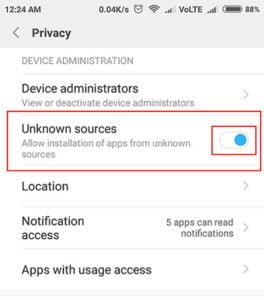
- To do that, go to the Android Mobile Settings > Privacy or Security > Tick the Unknown Sources.
- Download the Fouad WhatsApp Latest Version v2.6 APK.
- Click on the above link to download the MOD APK file and install it.
- Now, open Fouad WhatsApp > Verify Mobile Number as you do on the official app.
- That’s it, explore all the superb features of this new WhatsApp MOD.
How to Update Fouad WhatsApp to New Version?
We always provide the latest version of Fouad WhatsApp apk on this post. To update Fouad WhatsApp first, you need to download the latest mod of Fouad WhatsApp from the download link provided.
When you see an update notification, come to this post and get the latest version of Fouad WhatsApp. For better convenience, you can bookmark this page. So, it will be easy to find the updated version.
Step 1: Get (download) the latest version apk of Fouad WA from HackTricks. Don’t install that now.
Step 2: Open Fouad WhatsApp. Go to Menu >> Fouad Mods >> Other Mods.
Step 3: Now, from the list of options, tap on “Backup WhatsApp data (5.0.7)”. The backup process will start instantly and finish within minutes.
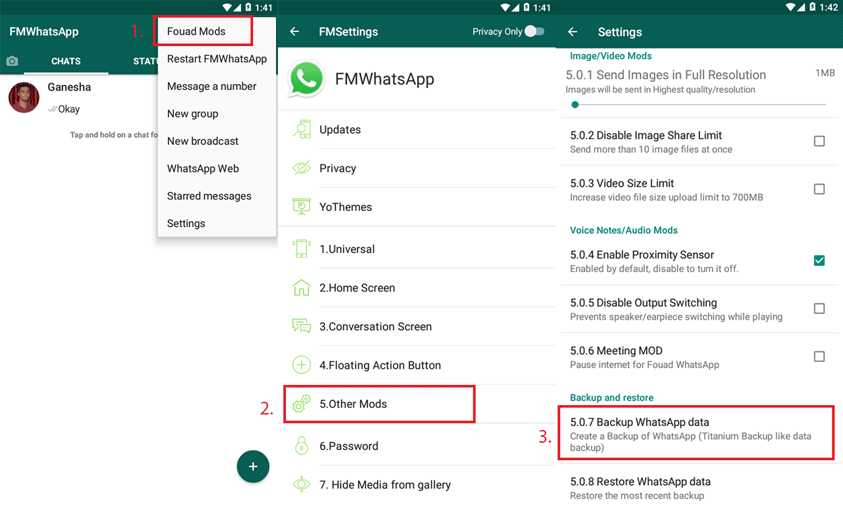
Step 4: After a successful backup, uninstall Fouad WA.
Step 5: Go to your file manager. Find that downloaded apk file of the latest version. Install it.
Step 6: After installation, open it. You will see a red “RESTORE” button. Tap on that. Yohooo! Your chat backup will be restored within minutes. It will take you to WhatsApp home screen without any verification.
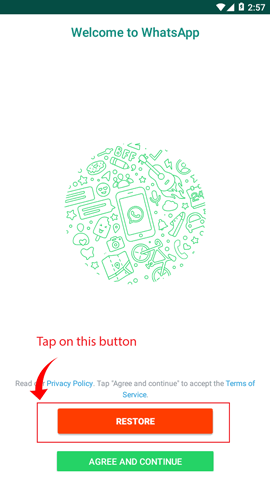
Isn’t it simple? Yes, it is.
Now you can start updating Fouad WhatsApp without worrying about the loss of old chats.
How to Install Fouad WhatsApp on PC?
Installing FouadWA on pc will take a while. Because unlike mobile to run Fouad WhatsApp we need an Android emulator like Bluestacks or Memu first.
- First, download the Bluestacks emulator from this link.
- When the download is complete, install Bluestack on your PC.
- After Bluestacks installation is complete, now open Bluestacks from the desktop.
- As Bluestacks is open now, you can install Fouad WhatsApp apk from dedicated app installation menu on Bluestacks or simply drag Fouad WhatsApp apk to blues stack. It will start installing it instantly.
- After Fouad WhatsApp installation is done, now open it. After that click on “Agree and Continue” and go to the next step.
- Next, provide your mobile number and confirm. You will receive OTP message on your mobile for that WhatsApp number. Provide OTP to verify your number. After OTP verification you can start messaging.
- Congratulation! Now you can use Fouad WhatsApp on your PC.
This is a very simple guide to run Fouad Mod Whatsapp on PC. Just follow all the steps above to get it done.
Download its alternative with iOS Theme
Want to experience iOS 11 or 12 styles WhatsApp in Fouad WhatsApp? Here, we have got RC FouadWA by RC Mods. It has got iOS 12 entry styles and icon packs inbuilt. So, you should download its apk now.
Now, it has been replaced with MB WhatsApp.
FAQs
Can I use FouadWA with WhatsApp?
Yes, you can use Fouad WhatsApp with your second number along with normal WhatsApp. This always comes handy when you have two numbers and want to use dual WhatsApp.
How much safe this app is?
Fouad WhatsApp is completely safe to use and 100% free from malware. There is also no ban issue. It comes with all new Anti-Ban feature. You can use it simply as you use official WhatsApp. No need to worry about the safety issue of FouadWA.
What is the difference between WhatsApp and FouadWA?
Regarding functionality, there is no difference at all. However, if you consider features, then Fouad WhatsApp is 100 times better than regular WhatsApp. It comes with absolutely no limit to WhatsApp features. Apart from that, it provides tons of custom features that are not available on WhatsApp.
Ending Lines
So, I know you have downloaded this dual WhatsApp APK. If you want me to compare the YoWhatsApp, GBWhatsApp, and Fouad, then, sorry. All these MODs are great. Excellent customization features with zero lag are there. Experience running multiple WhatsApp accounts at once. I think you want to install a 100% safe version. So, update it to the most recent release. Enjoy all the best customizations.
Do you have any problem with this app? Leave a comment now; we will assist you in no time.






How to unmute status in the new version 8.31
Please how do I see my status bar on the new Fouad mod WhatsApp